🎉

What's new

Wrap Logger
Wrap Logger

Wrap Logger

Production days, expenses, and invoices — built for film & TV crew. Know exactly what you earned, down to the overtime.

Overtime, done for you

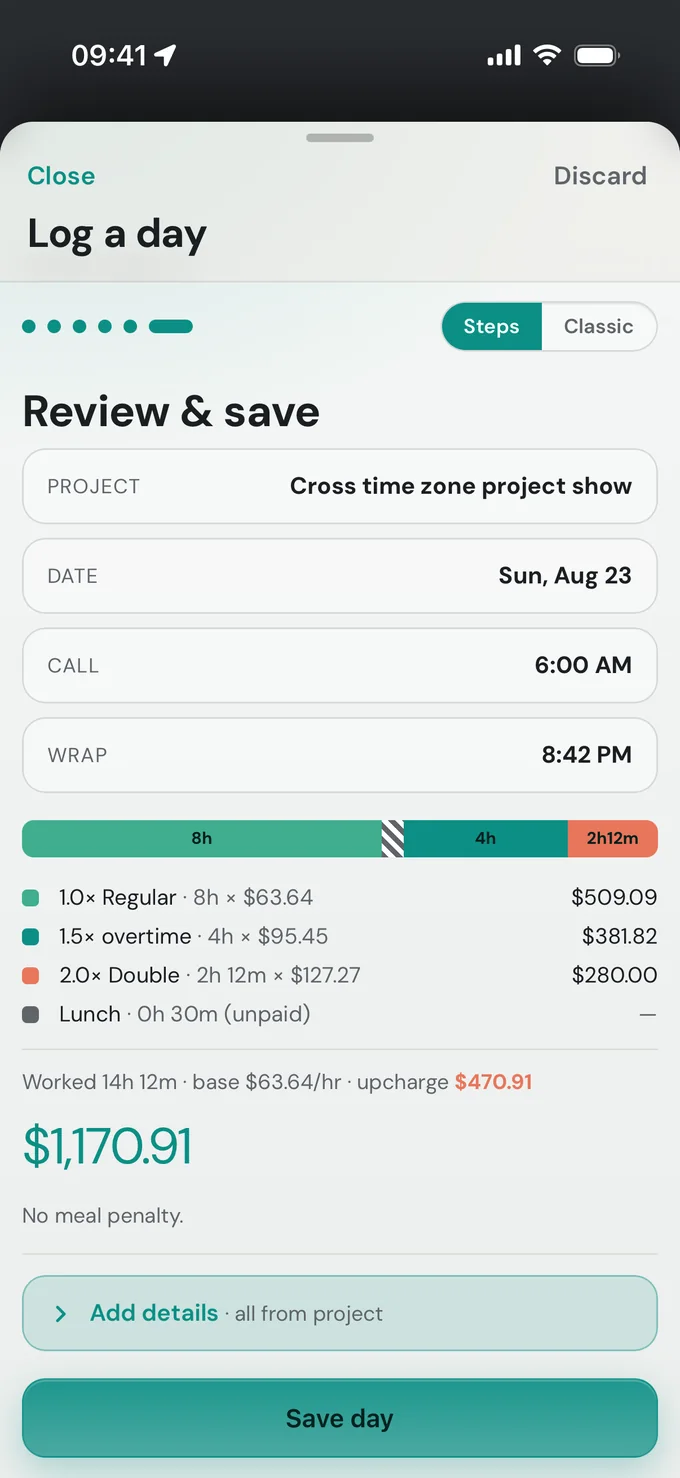
Enter call and wrap. The day-rate floor, 1.5× and 2× tiers, and meal penalties are calculated automatically.

Expenses & receipts

Snap a receipt and let it read the amount for you. Kit fees and expenses ride along to the invoice.

One-tap invoices

Turn a run of days and expenses into a clean, professional PDF invoice ready to send.

Time format
Created by Ethan Yuheng Xie · @ethanxie1998

Wrap Logger

Production days, expenses, and invoices all in one

Sign in

No account yet? Create one
Created by Ethan Yuheng Xie · @ethanxie1998
What's your day rate?
A quick taste — no account needed. We'll do the overtime math for you.
Demo Feature Film · day rate covers 12h · overtime 1.5× after 8h · 2× after 12h
What day was it?
Tap a recent day, or pick another.
When did you get called?
Tap to set your call time.
When did you wrap?
Overtime is figured from here.
Here's your day
Guaranteed full day rate
Lunch (hrs)
That day comes to
$0
Keep this day
Create a free account and we'll save this as your first record. Projects, expenses, and invoices all unlock.

Before you start

Please read and agree to continue.

Wrap Logger is an estimating and record-keeping tool, not legal, tax, accounting, or payroll advice. Overtime is calculated using California daily overtime conventions (1.5× after 8 hours, 2× after 12 hours in a workday, applied to a day-rate-derived hourly rate). Actual pay rules vary by union or guild contract, role, employer, jurisdiction, and circumstance.

Figures produced here may be incomplete or inaccurate for your situation. Always verify every number against your deal memo, contract, paymaster, or a qualified professional before relying on or submitting it. You are solely responsible for the accuracy of invoices, records, and tax summaries you create and send.

Your data is stored under your account; keep your own backups of anything important. The app and its creator accept no liability for errors, omissions, or any loss arising from its use.

By choosing “I agree,” you accept these terms and may use the app. If you do not agree, you can delete your account and data instead.

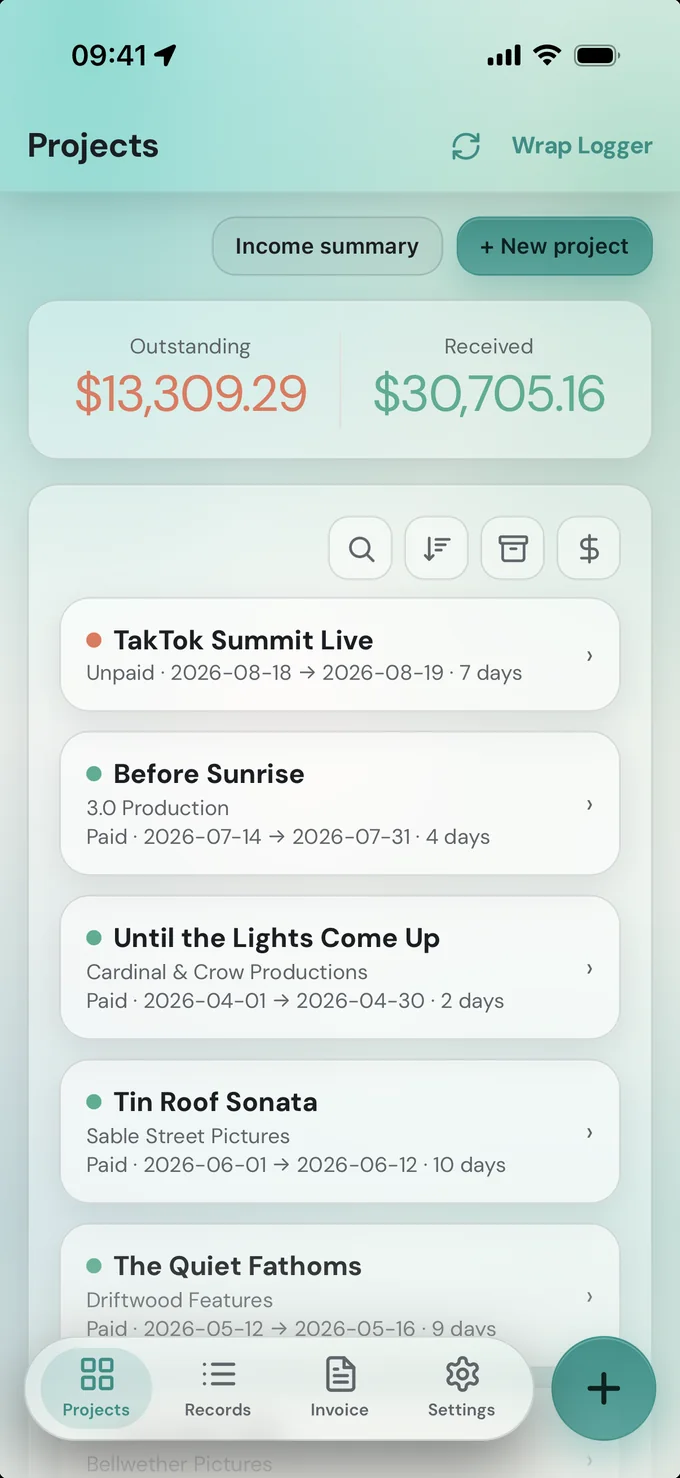
ProjectsWrap Logger
0 selected
Which project?
Where should this day be logged?
What day was it?
Tap a recent day, or pick another.
When did you get called?
Tap to set your call time.
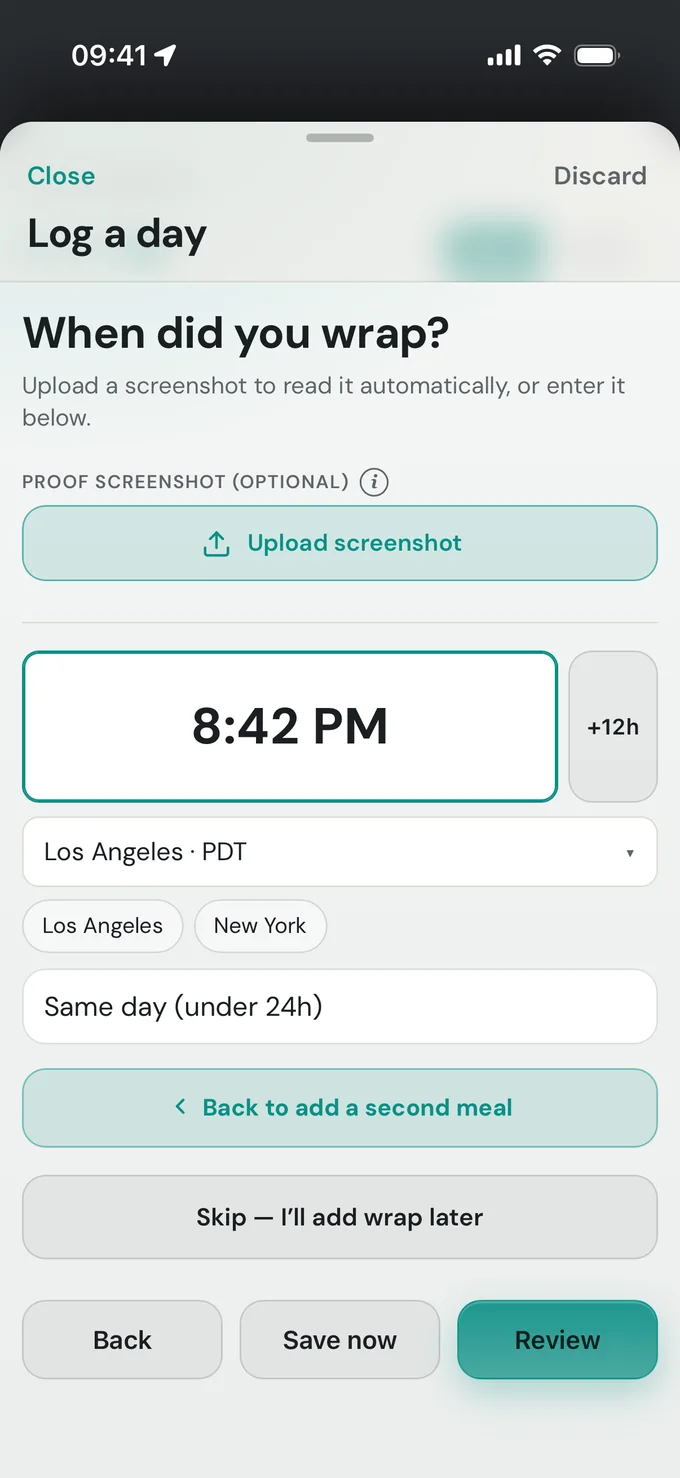
When did you wrap?
Upload a screenshot to read it automatically, or enter it below.
Review & save
Batch add days
Add several normal, full-rate days at once — into this project.
Review batch
These days will be added to the project.
Finishing your unfinished day
Add the wrap time (and a screenshot if you have one), then save to complete it.
Logging into
Proof screenshot (optional)i
Snap or upload a map screenshot or a photo of a clock. The app reads the wrap time from it automatically — experimental, so always double-check the wrap time below.
Drag & drop a screenshot or photo here, or drop a file onto this box.
Call & wrap — the two key times
Add details
Guaranteed full day ratei
You're paid the full day rate even if you wrap early. Overtime is still added beyond the project's covered hours.
Lunch is paidi
Counts the lunch toward worked hours instead of deducting it.
Meal penalties (optional)
If a meal was late, enter how many half-hour periods late. Standard SAG-AFTRA schedule applies ($25 first, $35 second, $50 each after) — editable in Account.
California non-union (Labor Code 226.7): a missed or late compliant meal is a flat 1 hour at your regular rate (not escalating), capped at one per day. A missed rest break is a separate 1-hour premium.
Meal break missed or late — add 1 hour at regular rate
Rest break missed — add a separate 1 hour at regular rate
Express batch — add several normal days at once
For smooth shoots where every day was a normal full-rate day.
Tap the days you worked
Which project?
Where should this expense go?
Adding to
Standalone
Reads the total, the items, and picks a category — experimental, so double-check it.
Drag & drop a receipt image or PDF here, or drop a file onto this box.
How much?
$
Category
Add details
Repeat on more than one dayi
Tap the days
Just this day = one expense. Run of days = one combined line covering a stretch of days. Specific dates = a separate entry for each date you pick.
Invoicing
All logs

Summary

Invoice details

Your name / role (shown on the PDF)
From / Bill-to / Invoice # edit
From (you / sender)
Bill to (recipient — usually filled at invoice time)
Paste a contact block to autofill

Payment methods to show

Export options

Include the visual time bars for overtime days (the day-rate / lunch / 1.5× / 2× timeline under the table).
Share opens your device’s share sheet (Mail, Messages, AirDrop) with the PDF attached — send it to production or to yourself to forward.

PDF includes a full per-day rate breakdown and embeds each proof screenshot. Estimating tool only — verify against your deal memo.

Showing archived projects

Signed in as

Display

Time format
Applies everywhere times are shown (logs, records, exports preview). Saved on this device.
Appearance
“Auto” follows your device’s light / dark setting.
High-contrast mode
Solid surfaces with stronger text and borders, for low vision.
Larger text
Scales the whole app up (about 15%) for easier reading.

Share Wrap Logger

Send the app to a fellow crew member, or have them scan the code.
Or scan to open on another phone:

Add to home screen

Install the app for one-tap access and a full-screen, app-like experience.
Other devices & browsers

Invoice "From" preset

Saved here once and prefilled into new projects and invoices.

Saved roles

Save the name/role lines you use (e.g. “Ethan Xie, Gaffer”). Pick one at invoice time.

Custom invoice fields

Extra label/value lines shown on every invoice PDF (e.g. “Loan-out #”, “Vendor ID”).

Kit presets

Save the gear you charge for (e.g. “3-ton grip truck · $350/day”, “Wireless unit · $50/day”). Pick them as chips in the Expenses tab — then set the quantity and days there.
Saved presets

Meal penalty rules

Choose which meal penalty basis new projects use by default. You can still override it per project.
Union / SAG-style schedule
Per half-hour late. Default is the SAG-AFTRA schedule. Edit if your contract differs.
California non-union basis has no editable schedule — it's a flat 1 hour at your regular rate (plus an optional separate hour for a missed rest break), per Labor Code 226.7.

Forms of payment

Stored privately under your account (only you can read it). Select which to show when exporting an invoice.
ACH / bank transfer encrypted
Bank fields are encrypted in your browser with a passphrase before being saved — the server only ever stores unreadable ciphertext, and even this dashboard can't show them without your passphrase. If you forget the passphrase, these details can't be recovered (you'd just re-enter them).
Payment reminder timing
After you export an invoice, remind me to check on payment this many days later (if I haven't marked it paid). A project's own due date, when set, takes priority over this.
Saved with Save account details below.

Client contacts

Save production companies and contacts you work with repeatedly, then pick them to autofill a project or invoice.
Quick add — paste a block of text
Paste a signature or contact block; the app pulls out the fields. Check and edit before saving.

Change password

Danger zone
Permanently delete all your data — projects, logged days, expenses, receipts, clients, and saved settings. This cannot be undone.
app icon

Wrap Logger

App zoom (for screenshots)

Created by Ethan Yuheng Xie — a sound mixer building the day-rate, expense, and invoicing tool he wanted on set. @ethanxie1998

What's new
Want to revisit the first-run walkthrough?
Want to explore with example data? Adds a “Sample Project” with a few days and expenses. You can delete it anytime from the Projects page.

Disclaimer

This app is an estimating and record-keeping tool, not legal, tax, accounting, or payroll advice. Overtime is calculated using California daily overtime conventions (1.5× after 8 hours and 2× after 12 hours in a workday, applied to a day-rate-derived hourly rate). Actual pay rules vary by union or guild contract, role, employer, jurisdiction, and individual circumstance. Figures produced here may be incomplete or inaccurate for your situation. Always verify every number against your deal memo, contract, paymaster, or a qualified professional before relying on or submitting it. You are solely responsible for the accuracy of invoices and records you create and send. The app and its creator accept no liability for errors, omissions, or any loss arising from its use. Data is stored on your account; keep your own backups of anything important.

Submit feedback

Found a bug or have an idea? Send it straight to me.

Optional — images only, up to 8 MB (larger images are compressed automatically).

Vibe coded with Claude

Icons by Lucide (ISC License)

Disclaimer: This is an estimating tool, not legal, tax, or payroll advice. Overtime is calculated using California daily overtime rules (1.5× after 8 hours and 2× after 12 hours in a workday, applied to a day-rate-derived hourly rate). Rules vary by union or guild contract, role, employer, and individual circumstance — always verify figures against your deal memo, contract, or a qualified professional before submitting them.

Created by Ethan Yuheng Xie · @ethanxie1998

Unsaved changes

You changed your settings but haven’t saved. What would you like to do?
Double-tap to zoom

Edit day

CA non-union: each premium is 1 hour at the regular rate.
Meal break missed/late (1 hr)
Rest break missed (1 hr)
Guaranteed full day rate
Lunch is paid
Proof screenshot

Edit express batch

Edit expense

How much?
$
Category
Receipt / screenshot

Move records

Offset dates

Use a negative number to move earlier — e.g. 7 shifts everything one week later, -1 shifts one day earlier.
Wrap time
:
– –